From empty page to finished PDF

Eight steps, and none of them are admin

This is the whole journey through Tessira, written out honestly — including the parts that take a while, the parts that are instant, and exactly what happens to your information at each stage. Nothing here is aspirational: it is what the product does today.

The whole path

What you will actually do, in order

Steps one to five get you a finished CV. Six and seven are optional second opinions. Eight is the file you send.

1

Create your account

Email address and a password. Tessira sends a verification link and waits until you have clicked it — an unverified address cannot sign in, which keeps somebody else's typo from becoming your account.

2

Start a CV and give it a name

New CVs are genuinely blank: empty fields, all eight sections present and waiting. The name is for you — “Product roles 2026”, “Academic version” — and never appears on the document itself.

3

Fill the sections

Profile, Summary and Experience are always on. Education, Skills, Languages, Interests and Reference are yours to switch off or drag into a different order. This is the step that takes real time; everything after it is minutes.

4

Choose a template and a colour

Four designs, each with six accent colours chosen to suit it, plus a picker if you want a specific hex. Switching template reflows your existing content — you never re-enter anything.

5

Preview the real thing

The preview renders the actual template in your browser, at A4 proportions, with your content in it. It is not an approximation of the PDF — it is the same rendering path, which is why the two agree.

6

Run a general review

Optional, and always started by you. Tessira measures the document, sends an anonymised copy to DeepSeek for critique, checks the answer against your text, and comes back with a grade, quoted problems and rewrites.

7

Save a job description and match against it

Paste a posting or hand over a URL. It joins a library you can reuse. Matching a CV against it returns a score, what the posting asks for that you already evidence, and what is missing.

8

Export the PDF

A real A4 PDF, printed by a browser engine with the fonts embedded and the page colour running to the paper edge. Download it as many times as you like; an unchanged CV comes back instantly.

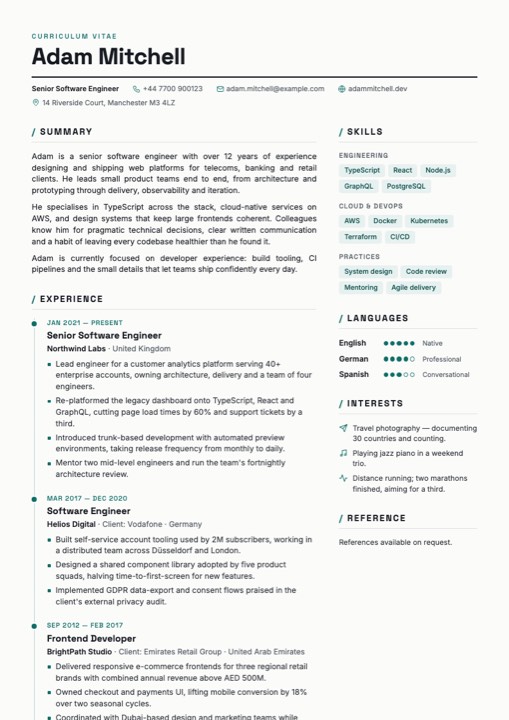
The Apeal template rendered as a full A4 page: a two-column CV with a teal timeline rail down the experience column, skill chips grouped by category and proficiency dots for languages.
Steps 2 and 3

The writing is the work — so the tool stays out of it

Every section is its own page with its own form, and a rail down the left shows what has real content in it and what does not. You can jump around freely; there is no wizard insisting you complete Education before you are allowed to think about your summary.

Nothing has to be saved. Stop typing and your work is written a fraction of a second later, with an indicator that tells you the truth about it. If a write fails, it keeps trying and keeps saying “Saving…”. It will not turn green on a document that did not land.

Saving… All changes saved
  • Dates are month-and-year dropdowns with a “Present” option, never free text
  • Locations come from a full country list, so flags and codes render correctly
  • Gaps of more than a month between roles raise a quiet advisory, never a block
  • Already have a CV elsewhere? Import a JSON file and start from that instead
Steps 4 and 5

Choosing the design is a decision, not a migration

Your content and the template that presents it are stored as separate things. That single decision is what makes the rest of this step cheap.

The gallery shows live pages

Each card in the template gallery is a real render of a sample CV at A4, not a screenshot taken months ago. Change an accent and the card redraws, so what you are choosing between is genuinely what you would get.

Six accents, or a hex of your own

The six per template were picked against that design, each paired with a darker variant for text and rules so contrast survives. Pick your own colour and the darker partner is worked out for you. Choose nothing and the template keeps its designed colours.

Preview before you commit

The preview opens the template with your content in it, laid out on A4 sheets. This is where you find out that your summary runs three lines too long, or that the third role lands awkwardly across a page break — while it is still easy to fix.

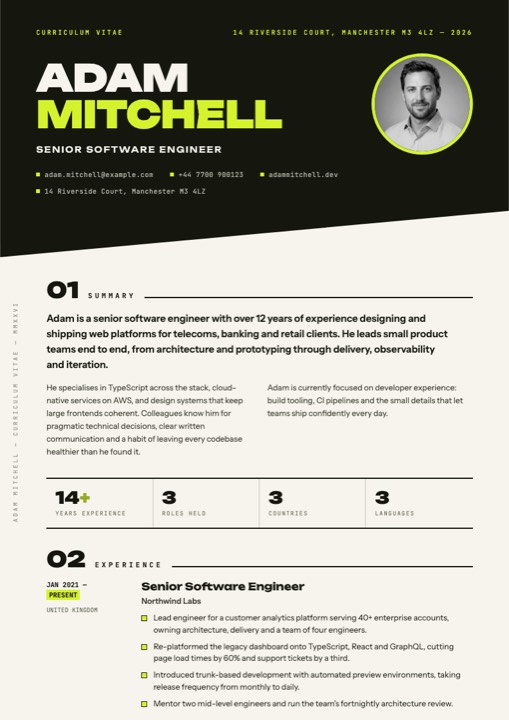
The Ink and Chartreuse template rendered as a full A4 page: near-black diagonal bands, an oversized display name, an electric chartreuse accent and a four-figure statistics band across the first page.
Step 6

A review that has already read the document properly

Press the button on your CV's overview page and three things happen in order. First Tessira measures your CV itself: how many bullets carry a number, how many open with a strong verb, how long the roles are, where the clichés and filler and repeated openers sit, whether your spelling is consistently British or a mixture. None of that is guessed.

Then those measurements and an anonymised copy of your text go to DeepSeek — twice. The first pass is forensic and returns quoted lines with rewrites beside them. The second stands back: positioning, whether the top of page one survives a six-second scan, what a sceptical reader would probe, and a score it has to justify.

Finally Tessira checks the answer. Any finding quoting a line that is not literally in your CV is discarded, as is any suggestion identical to what you already wrote. You are told how many were dropped. It takes up to a minute or so, and you can walk away — the work finishes on the server and the result is waiting when you return.

  • Nothing runs automatically — every review is a click you made
  • You can read the exact anonymised text before you spend a run
  • The result is saved to the CV, so reopening it later costs nothing
  • Edit enough afterwards and the saved result is flagged as out of date
Step 7

Matching a real posting, rather than guessing at one

A general review asks “is this a good CV?”. A job match asks a much more useful question: “is this a good CV for this role?”

Get the posting in

Paste the text, or give Tessira the URL and let it try to pull out the title, company and body for you. That fetch is an ordinary web request rather than a model call, so it is free — and when a site refuses to be read, Tessira says so plainly instead of inventing a posting. The form is always the final word.

It goes in a library, not on one CV

Saved job descriptions belong to your workspace, so a role you enter once can be matched against every CV you have. Recruiter contact details are stripped out of a posting before it is ever used for a match.

What you get back

A score with its component parts, an explicit list of the requirements your CV already evidences, the ones it does not, and ranked advice on closing the gap. The two results look deliberately different on screen — a grade square for the review, a ring and a percentage for a match — so you can never mistake one for the other.

Nothing is scored behind your back. Tessira does not quietly grade every CV against every saved role, because each analysis is a real request with a real cost. Matches happen when you ask for them, and deleting a job description keeps the matches you already ran — they are part of that CV's history.
Step 8

The file you actually send

The last step is the one most tools quietly get wrong, so it is worth being specific about how this one works.

Printed, not converted

Your CV is rendered in a real browser engine and printed to A4 with backgrounds on. The page breaks in the file are the ones the layout engine chose, not an approximation produced by a second piece of software.

Fonts travel with it

Every typeface the template uses is embedded before printing, so the document looks right on a machine that has never had those fonts installed.

Colour to the trim

After printing, the page colour is written underneath every page inside the PDF itself — the only reliable way to make a dark template stay dark all the way to the paper edge.

Selectable text

The PDF holds real text, not a picture of a page, so it can be searched, copied and read by machines as well as people.

And a JSON copy, whenever you want one. Alongside the PDF, any CV downloads as a plain readable JSON file of your content — no internal identifiers, no tracking. It imports straight back into Tessira, and it is a perfectly good backup even if you never come back.
At every step

Where your information is, stage by stage

Most privacy pages describe a policy. This one describes the mechanics: for each step above, what is stored, and whether anything leaves Tessira.

StepWhat is storedDoes anything leave Tessira?
Creating an account Your email address, and your password stored one-way so it cannot be read back — not by anyone, us included. Your email address goes to a transactional email provider so the verification message can be delivered. Nothing else.
Writing your sections Your CV, encrypted before it is written and kept in a namespace belonging to your account alone. No. Autosave writes to Tessira's own storage and nowhere else.
Choosing a template The template choice and accent colour, on the CV record. No.
Previewing Nothing new — the preview is a view of what you already saved. No. The template is assembled in your own browser.
Running an AI review The finished result is saved to your CV so you can reopen it for free. Yes. An anonymised copy of your CV text goes to DeepSeek, an external AI provider. Your name, contact details, photo and employer names are removed or replaced first, and the request is made from Cloudflare's network rather than your device — so your IP address, browser and account are not part of it.
Saving a job description by URL The title, company and body text of the posting, encrypted like everything else. Tessira fetches that public page. The job site therefore sees a request from Cloudflare, not from you.
Matching against a role The match result, on the CV record. Yes — the same anonymised path as a review, with recruiter contact details stripped from the posting beforehand.
Exporting a PDF or JSON The date of your last export, so the overview can show it. The file goes to your computer. That is the whole of it.
Two things Tessira will not claim. It is not end-to-end encrypted: your data is encrypted at rest and Tessira holds the key, which is exactly what allows a forgotten password to be reset without destroying your CVs. And an anonymised CV is not an absolutely anonymous document — a career has a recognisable shape, and anyone who already knows you might recognise it. Both of those are true, so both of them are written here rather than left out. The full detail.
Questions

What people ask before they start

How long does the whole thing take?
Steps four to eight are minutes. Step three — writing the actual content — is as long as writing is, and no tool can shorten that honestly. What Tessira removes is everything around it: no formatting, no fighting a word processor over page breaks, no wondering whether you saved.
Do I have to use the AI parts?
No. Steps six and seven are entirely optional and skipping them changes nothing about the rest. If you never press either button, no part of your CV is ever sent to an external provider.
Can I bring a CV I have already written?
You can import a Tessira JSON file directly, which fully replaces the contents of the CV you import into. Coming from a Word document or a PDF, the practical route is to paste your text into the relevant sections — which is also a decent moment to cut the third of it that is no longer doing any work.
What if I want several versions for different roles?
Keep as many CVs in one account as you like. Save the job description once, then match each version against it and compare the scores. That is the intended way to use the library, and it costs nothing to keep old results around.
What happens if I close the tab during a review?
The work carries on without you. The analysis finishes on the server and the result is written to your CV, so it is there when you next open the overview. Running it again afterwards returns the saved result immediately rather than starting over.
Is it free, and is there a catch?
It is free, and there is no billing in Tessira today — no trial timer, no card, no export paywall, no watermark on the PDF. It is made by a one-person studio; if that ever has to change, it will be said clearly and in advance.
What if I forget my password?
You reset it with a short-lived code sent to your email address, and your CVs are still there afterwards — the encryption key does not depend on your password, which is a deliberate trade-off in favour of not losing your work. Resetting also signs out every other device.

Start at step one

An account takes a minute, the first CV is blank and waiting, and you can export the finished PDF the same afternoon. Free to use, and yours to take with you.